

Cybersecurity professionals often create specialized tools to address the unique challenges of their field. Many of these tools are shared as open-source repositories (repos) on GitHub, a platform that fosters collaboration and learning. Making tools publicly available encourages transparency, innovation, and knowledge-sharing within the cybersecurity community.
If you’re new to coding or cybersecurity, learning how to clone a repository from GitHub is an essential skill. Cloning lets you access existing projects, understand how they work, and even contribute or modify them for your own needs, opening the door to practical learning and potential career opportunities.
What is GitHub?
GitHub is a platform for storing, managing, and collaborating on code. To use a project, you need to clone the repository onto your local computer. Cloning simply downloads a copy of the project’s files, giving you the ability to view, edit, or run the code.
By working locally, you can safely experiment with new features, fix bugs, or contribute improvements back to the project, allowing for a seamless and collaborative development workflow.
How to clone a repo?
- First, find a repository on GitHub that you want to copy. On the repository page and click the green “Code” button to open the dropdown.
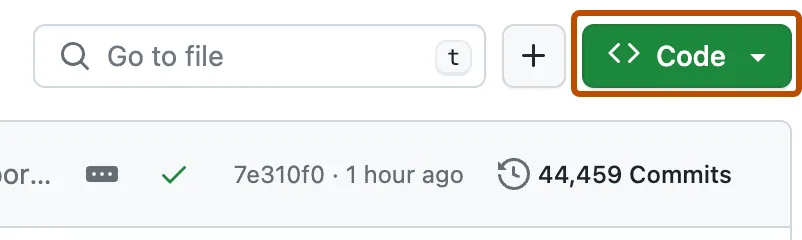
- You’ll usually see options for HTTPS or SSH. For beginners, HTTPS is the easiest option. Click on the copy icon to the right of the URL.

- Next, open your terminal or command prompt and navigate to the folder where you want the project saved. Then run the following command:
git clone <repository-URL>
- After running this command, Git will download all the files and create a new folder with the project name. You can then navigate into that directory and start working with the code.

Common Issues
While cloning is usually straightforward, you might run into a few issues:
- Git not being installed correctly
- Using the wrong repository URL
- SSH authentication errors (if using SSH option)
Why Cloning Matters
Cloning is a simple but powerful step in working with code. It lets you create a local copy of a project, experiment safely, test changes, and contribute to the original repository. Mastering this process improves your coding skills, deepens your understanding of version control, and prepares you for collaboration in modern software development.
Discover more from Cyber-Jot | Learn Cybersecurity & OSINT
Subscribe to get the latest posts sent to your email.
Leave a Reply